---
title: "Page Builder for WordPress: Build Pages Visually | Laioutr"
canonical_url: "https://www.laioutr.com/en/page-builder-wordpress"
locale: en
meta:
description: "Page builder for WordPress: Laioutr delivers the visual frontend. Marketing builds pages itself, content flows via WP REST API. Fast and GDPR-compliant."
"og:description": "Page builder for WordPress: Laioutr delivers the visual frontend. Marketing builds pages itself, content flows via WP REST API. Fast and GDPR-compliant."
"og:title": "Page Builder for WordPress: Build Pages Visually | Laioutr"
---
WordPress x Laioutr
# Page builder for WordPress: a visual frontend without theme development
Visual editor and frontend in one platform, live faster without a custom build
More speed and creative freedom for WordPress: Laioutr sits on top of the existing WordPress as a visual page builder, and the content stays where it is.
[Request a demo](https://www.laioutr.com/en/contact)

Certified Laioutr partners support the concept and delivery of the frontend for WordPress.
[](https://www.bestit.de/ "best it") [](https://www.datrycs.com/ "datrycs") [](https://www.valantic.com/ "valantic")
5/5
OMR Reviews
70+
Frontend components
Lighthouse 100
Performance from day 1
Made in EU
GDPR-compliant out of the box, EU hosting available
100% Match
## Page builder for WordPress: what does it mean?
WordPress is the most widely used CMS in the world: content, posts, pages, custom post types, permissions, multisite and multilingual support (WPML, Polylang) are its strengths. Traditionally a PHP theme delivers the frontend, but WordPress can also run headless. That is where Laioutr comes in: as a visual page builder and frontend layer that reads the content from WordPress via the WP REST API and WPGraphQL and delivers it as a fast website. WordPress stays the system, Laioutr delivers the frontend. Laioutr is also an integrated headless CMS with Content Collections, Studio and frontend in one platform, and can manage content itself where needed.
[Book a strategy call](https://www.laioutr.com/en/contact)
### 1. The backend stays WordPress
WordPress continues to manage content, posts, pages, custom post types, permissions, editorial workflows and translations. WP Admin and established processes stay unchanged, with all plugins and ACF fields.
### 2. The frontend is a free choice
There are several options for the frontend: a classic PHP theme, a headless setup (WP REST API or WPGraphQL) with a separate frontend, a custom build or a page builder like Laioutr. Each option has its pros and cons.
### 3. Content flows in real time via the WP REST API and WPGraphQL
No duplicated data, no sync conflicts: Laioutr reads the content from WordPress via the WP REST API and WPGraphQL and renders it, including multilingual content and multisite.
OPTIONS
## Which frontend options exist for WordPress?
With themes, Gutenberg and the WP REST API or WPGraphQL, WordPress provides the building blocks, but no modern, decoupled frontend product for non-developers. Every WordPress project therefore faces the frontend question. Four options are established in the market.
[Book a strategy call](https://www.laioutr.com/en/contact)
### 1. Classic PHP theme
The classic WordPress route: a PHP theme, possibly with a page builder plugin. Quick to set up, but performance, maintenance and consistency become harder as the site grows. A fit for small sites with standard requirements.
### 2. Headless WordPress (REST or WPGraphQL) with a separate frontend
WordPress delivers the content via REST or WPGraphQL, and the frontend is built separately in-house. Maximum freedom and performance, but the design system, components and maintenance stay with the in-house team. A fit with the right frontend team.
### 3. Custom build (Next.js or Nuxt)
Maximum control, highest effort: a six- to twelve-month build phase and ongoing maintenance by an in-house frontend team that connects the WP REST API and WPGraphQL itself. A fit when frontend engineering is a strategic core competency.
### 4. Laioutr Page Builder
A visual page builder and frontend platform with 70+ components, a connection to WordPress and EU hosting as an add-on. Fastest time-to-launch, lowest learning curve: marketing and editorial teams build pages themselves. A fit for a fast go-live without a custom-build investment.
USE CASES
## Use cases: Laioutr on WordPress in practice
Laioutr is built for WordPress setups that need to change and scale fast: from the corporate website to multisite portfolios to campaign landing pages with high editorial volume.
[Book a strategy call](https://www.laioutr.com/en/contact)
### Multisite and multi-domain on one WordPress
WordPress Multisite manages several websites, brands and domains from one instance. Laioutr turns them into standalone frontends: one component pool, many brand presences, each with its own design.
### Campaign and landing pages without a ticket
Marketing builds landing pages visually from ready-made building blocks, without custom code and without a developer ticket. Content comes from WordPress, the layout takes shape in the page builder.
### Multilingual websites
WordPress manages translations via WPML or Polylang, Laioutr delivers them consistently. Languages, layouts and content can be controlled per site.
### Content-driven sites and blogs
WordPress is strong at content and blogs. Laioutr delivers posts, pages and custom post types as a fast frontend, ideal for content-heavy sites with many editors.
### Relaunch without switching backends
The existing WordPress frontend is renewed without touching content, permissions or editorial processes. Migration in phases, with a clear rollback plan.
### New WordPress projects live fast
New WordPress project, fresh start: with Blueprints and the UI library, a project goes live in weeks instead of months invested in a custom build.
Laioutr vs. building the frontend in-house
## Laioutr or in-house development for the WordPress frontend?
Both paths lead to a decoupled frontend on WordPress. The difference lies in time-to-launch, maintenance load and the question of who can build pages. The direct comparison:
Pricing Plans Comparison
| Compare differences | Laioutr Page Builder | Eigenentwicklung (Next.js / Nuxt) |
| --- | --- | --- |
| Laioutr Page Builder Eigenentwicklung (Next.js / Nuxt) |
| Builder und Komponenten Was aus der Box kommt und was selbst aufgebaut werden muss. |
| Visueller Page Builder Drag-and-Drop-Editor für Marketing- und Redaktions-Teams. | Inklusive (Studio) Live-Preview, komponentenbasiert | Nicht enthalten Eigenbau oder externes Tool |
| Frontend-Komponenten Vorgefertigte UI-Bausteine für Seiten, Landing- und Content-Pages. | 70+ Komponenten Design-Token-basiert, anpassbar | Selbst aufbauen Komplette UI-Bibliothek selbst entwickeln |
| Blueprints und Vorlagen Startpunkt für neue Websites ohne Greenfield-Aufwand. | Vorgefertigte Blueprints Sofort einsatzbereit, voll erweiterbar | Greenfield Designsystem komplett selbst aufbauen |
| Hosting Wo das Frontend ausgeliefert wird und wer es betreibt. | Als Add-on (Cloud/Edge Hosting) EU-Hosting verfügbar, kein separater Deploy | Selbst hosten Vercel, AWS, eigene Infrastruktur |
| Architektur und Compliance Wie flexibel die Plattform ist und was regulatorisch abgedeckt ist. |
| Backend-Flexibilität Welche CMS- und Commerce-Backends sich anbinden lassen. | Multi-Backend WordPress, weitere CMS und Commerce-Systeme | Backend-spezifisch Code an WordPress-API gebunden, Wechsel teuer |
| Performance und Core Web Vitals Wie viel Aufwand für Lighthouse-100-Niveau nötig ist. | Out of the box LCP 1,2 s im Median, Lighthouse 100 als Ziel | Manuelles Tuning Performance-Engineering durch Team |
| BFSG und WCAG 3.0 Konformität mit Barrierefreiheitsstärkungsgesetz und WCAG 3.0. | Im Standard WCAG 3.0, BFSG, EN 301 549 | Eigenverantwortung Audit separat erforderlich |
| Datenschutz und Serverstandort Wo Daten verarbeitet werden und welche EU-Verträge gelten. | EU-Hosting verfügbar DSGVO-konform ab Werk, weitere Regionen auf Anfrage, EU-Standardvertrag | Hosting-abhängig Abhängig vom Deployment-Ziel |
| Team und Wirtschaftlichkeit Wer mit der Plattform produktiv ist und was sie über die Zeit kostet. |
| Lernkurve Wie schnell ein neues Teammitglied produktiv wird. | Niedrig Redaktion onboardet in Tagen | Hoch React/Vue plus WP REST/WPGraphQL |
| Time-to-Launch Realistische Zeitspanne bis zum Live-Gang einer neuen Website. | Wochen Mit Blueprints und UI-Bibliothek | Monate Sechs- bis zwölfmonatige Build-Phase |
| Ideales Team-Setup Wer mit der Plattform arbeiten kann und wer arbeiten muss. | Cross-funktional Marketing, Redaktion, Design und Dev gemeinsam | Engineering-only Drei plus Frontend-Engineers |
| Preismodell Wie sich Kosten zusammensetzen, Software plus Betrieb plus Entwicklung. | [SaaS (planbar) Transparente Pläne, Hosting als Add-on](https://www.laioutr.com/pricing/sites) [Preise ansehen](https://www.laioutr.com/pricing/sites) | Engineering-Kosten Build plus dauerhafte Wartung |
Comparison based on a typical mid-market setup. The actual scope depends on the WordPress project, the requirements and how the project is scoped.
In-house build
### When an in-house build is the right choice
A dedicated frontend team with WordPress/API experience and at least three engineers is in place. Exactly one WordPress frontend with highly specialised requirements is being built. Frontend engineering is a strategic core competency. Classic case: a brand with its own engineering team and a demand for pixel-level control.
LAIOUTR
### When Laioutr is the right choice
Go-live in weeks instead of months, editorial and marketing teams build pages on their own, several WordPress sites or brands run in parallel, WordPress should stay and only the frontend gets modernised, and BFSG and WCAG have to be covered without a separate audit. Classic case: an organisation that wants to modernise and scale its WordPress frontend without a double-digit engineering investment.
BLUEPRINTS
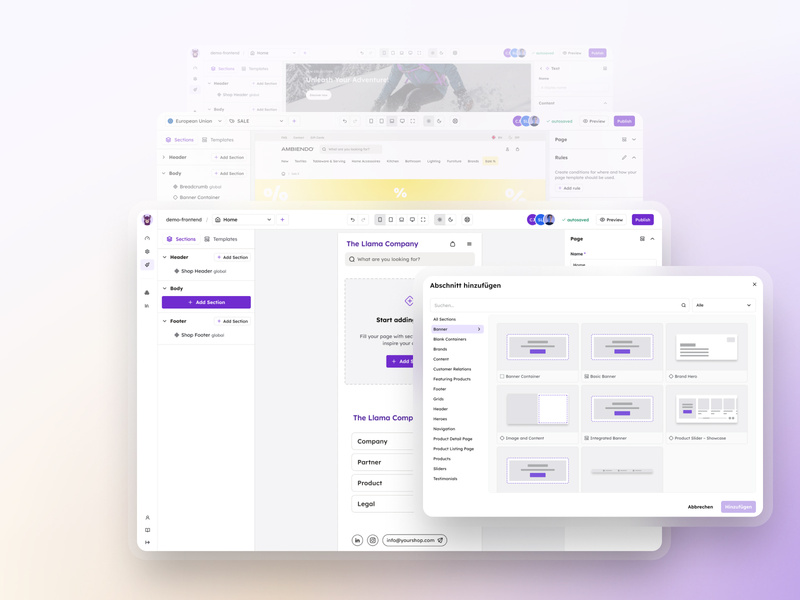
## Start from a Blueprint instead of from scratch
Blueprints are pre-composed frontends for each industry, customisable right away and suited to the WordPress setup. Starting from a Blueprint shortens the way to go-live.
[View Blueprints](https://www.laioutr.com/en/blueprints)
UI PREVIEW
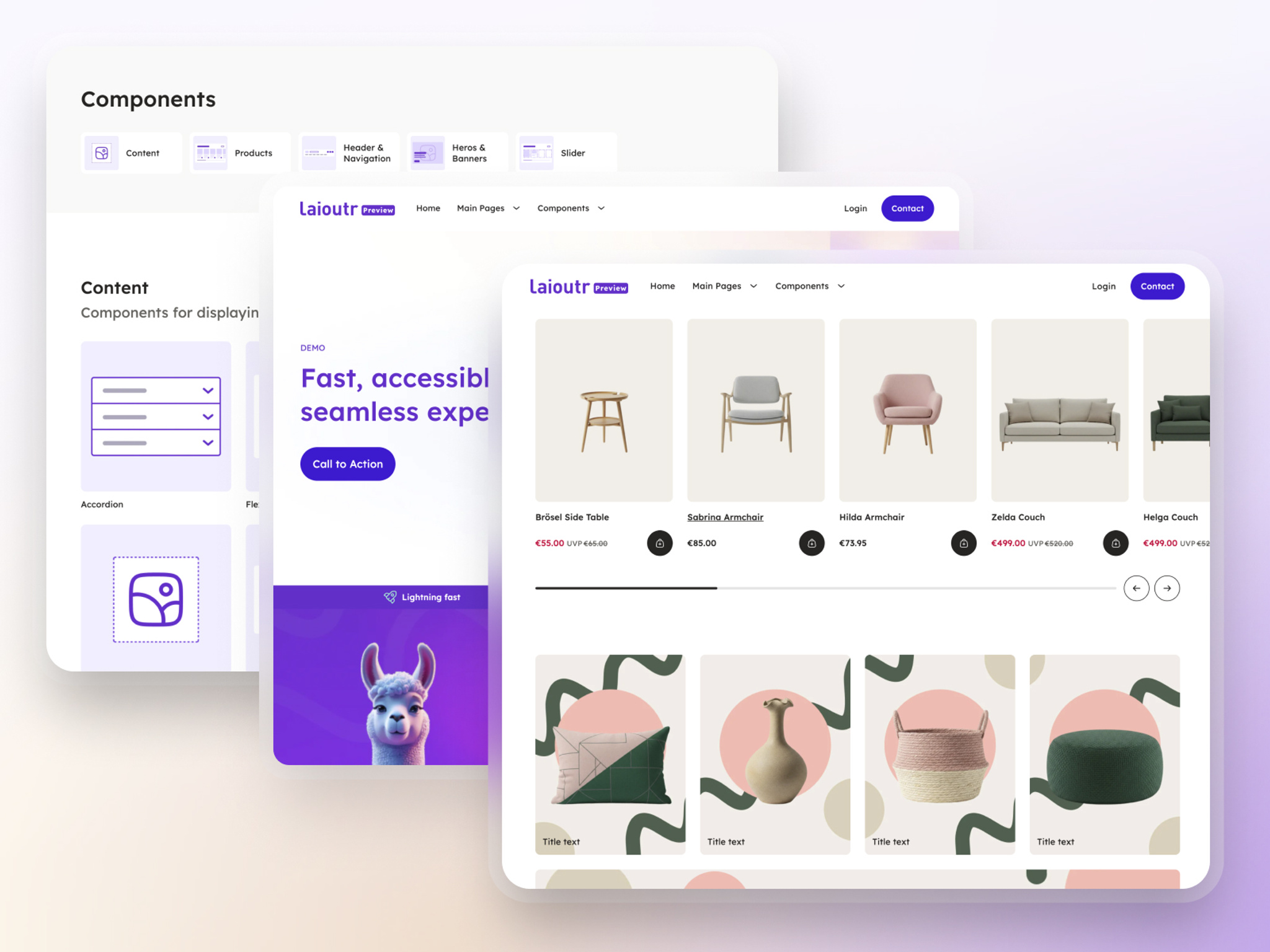
## What can be created with Laioutr on WordPress
Home pages, landing pages, campaign pages, content pages, blogs, careers and product pages and more.
[Explore the UI preview](https://www.laioutr.com/en/shop-demos)
No team has to do this alone: certified composable partners support frontend projects with Laioutr, from greenfield setups to migrating an existing WordPress frontend.
[](https://www.bestit.de/ "best it") [](https://www.datrycs.com/ "datrycs") [](https://www.valantic.com/ "valantic")
FAQ
## FAQ: page builder for WordPress
Does Laioutr work with WordPress (multisite and multilingual)?
Yes. Laioutr reads the content from WordPress via the WP REST API and WPGraphQL and supports multisite, multiple domains and multilingual setups (WPML, Polylang), provided the corresponding endpoints are available.
How does Laioutr differ from a custom build with Next.js?
A custom build typically means six to twelve months of engineering plus ongoing maintenance by an in-house frontend team. With Laioutr, Studio and 70+ components are part of the platform, and hosting is available as an add-on. Time-to-launch drops from months to weeks, by around 65 % for landing pages.
How does Laioutr differ from a classic theme or page builder plugin?
Classic themes and page builder plugins such as Elementor run in the WordPress PHP frontend, so performance and maintenance depend on the theme and plugin stack. Laioutr provides a decoupled frontend with 70+ components, Themes and Blueprints that delivers WordPress content fast and accessibly. EU hosting is available as an add-on.
How does Laioutr connect to WordPress?
Laioutr connects through the WP REST API and WPGraphQL. Standard content is supported (posts, pages, custom post types, menus, ACF fields, translations), plus project-specific endpoints for custom logic.
Does Laioutr work with WordPress Multisite?
Yes. WordPress sites, including multisite setups, are treated as standalone frontends in Laioutr. Layouts, content, languages and domains can be configured separately per site, in line with the WordPress concept.
Can we keep using editorial workflows and permissions from WordPress?
Yes. Editorial workflows, permissions and approvals stay in WordPress. Laioutr renders the approved content, and governance remains entirely in WordPress.
WordPress can already run headless, so why Laioutr?
Precisely because WordPress provides content via REST or WPGraphQL, the frontend question remains open: the API delivers the data, but not a finished frontend that can be operated visually. Laioutr builds on it and makes the frontend usable for marketing, editorial and development together, without in-house frontend development.
How long does implementation with Laioutr take?
A pilot is usually live within 14 days, and migrations take less than 14 days at the median. Founder-led migration is standard, not an extra. With several WordPress sites or complex custom logic, the team plans more time accordingly.
What does Laioutr cost compared to a custom build?
Laioutr works with transparent SaaS plans; details are on the [pricing page for websites](https://www.laioutr.com/en/pricing/sites). Total cost of ownership is typically below a custom build, because Studio and components are part of the licence and no separate frontend team is needed. Hosting is available as an add-on.
Can we switch the backend later without rebuilding the frontend?
Yes. Laioutr is backend-agnostic and connects 50+ backends. If another system joins WordPress later, such as a commerce backend, it is connected via API instead of rebuilding the frontend.
Is the solution BFSG and GDPR compliant?
Yes. Laioutr is GDPR-compliant out of the box, EU hosting is available, further regions on request (US, APAC), and regional data residency is possible. EU standard contractual terms and German-language support are included. WCAG and BFSG (the German Accessibility Strengthening Act, binding since 2025) are covered by default: compliance is built in, not bolted on.
What about our existing WordPress plugins?
Backend-side plugins (editorial, SEO, import, workflows) stay unchanged. Frontend-oriented functions are typically replaced by Laioutr components or pre-integrated apps. The plugin stack is reviewed in the migration audit.
Laioutr has its own headless CMS. Is WordPress still needed?
Both options work. Laioutr is also an integrated headless CMS with Content Collections, Studio and frontend in one platform. Teams that want to keep WordPress use Laioutr as the visual page builder and frontend on top of it. Teams that want to consolidate systems can manage content in Laioutr step by step. More on the [headless CMS](https://www.laioutr.com/en/headless-cms) page.
## Latest insights on CMS and frontend
[Go to the insights](https://www.laioutr.com/en/blogs/insights)
[Frontend options for WordPress: from CMS to live storefront
WordPress is a widely deployed CMS you can run headless: it delivers content through the WP REST API…](https://www.laioutr.com/en/blog/headless-wordpress-frontend)
[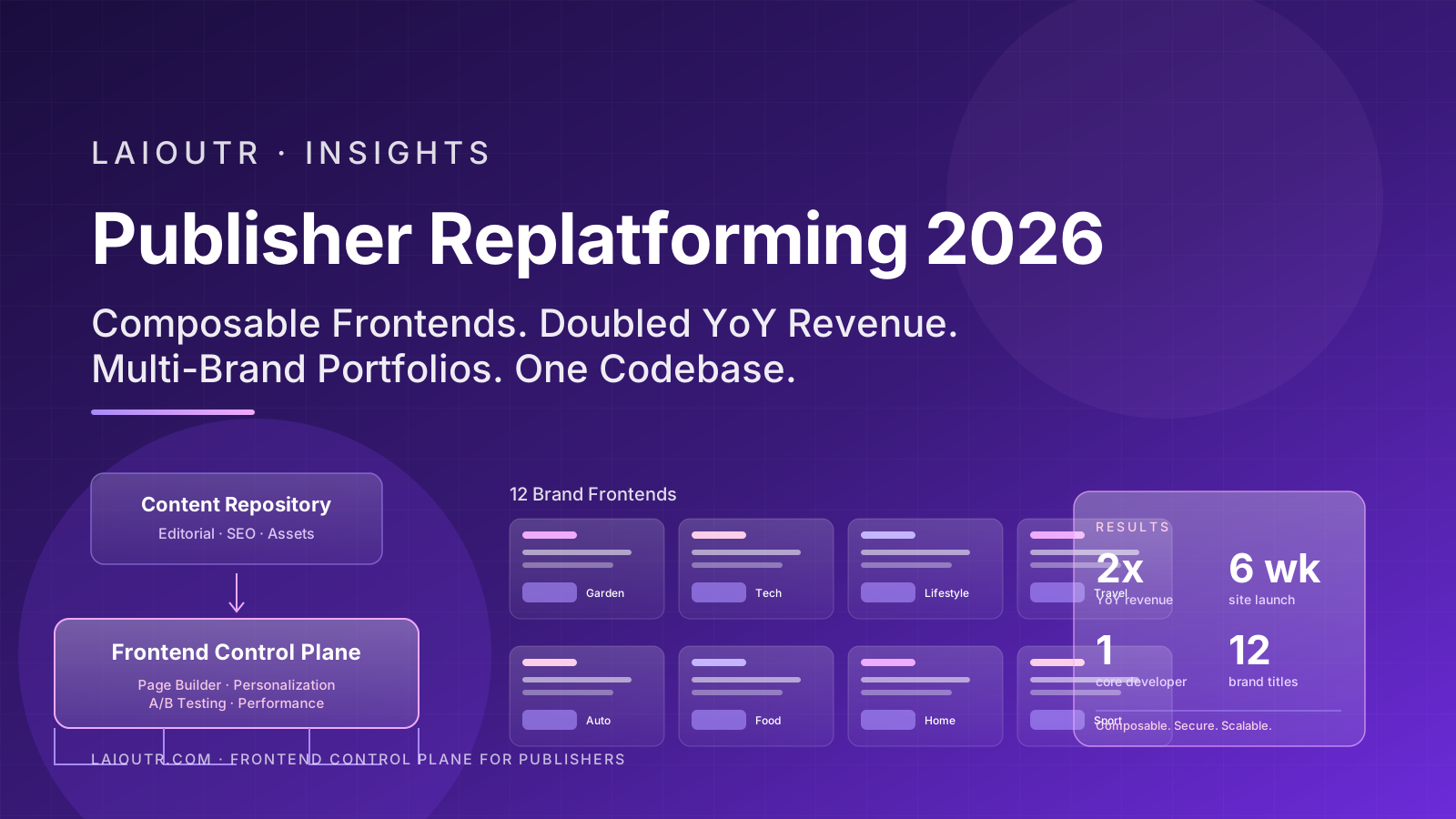Publisher Replatforming in 2026: Why Composable Frontends Are Doubling Magazine Revenue
The most surprising number in publisher boardrooms this year is not a traffic figure. It is not an a…](https://www.laioutr.com/en/blog/publisher-replatforming-in-2026-why-composable-frontends-are-doubling-magazine-revenue)
[What Is Backend? A Comprehensive Intro to Server-Side Development
When you browse an online store, click “buy,” submit a form, or log into your favorite app, you’re i…](https://www.laioutr.com/en/blog/what-is-backend-a-comprehensive-intro-to-server-side-development)
[Alternative to Ecwid: Full-Featured Composable Commerce for Scaling Brands
Ecwid created a unique niche: simple, embeddable shopping carts for websites that are not primarily …](https://www.laioutr.com/en/blog/alternative-to-ecwid)
[Alternative to WooCommerce: Enterprise-Ready, Scales Faster, Marketing-Controlled
WooCommerce is the elephant in the room: over thirty-eight percent of all online shops globally run …](https://www.laioutr.com/en/blog/alternative-to-woocommerce)
[WordPress Alternative Laioutr: A DXP Instead of Plugin Hell
Laioutr is the faster-to-launch, more secure, and AI-native alternative to WordPress, built for mark…](https://www.laioutr.com/en/blog/wordpress-alternative-laioutr)
READ MORE
## More page builders and fundamentals
### Composable Visual Page Builder
The overview: a visual page builder for any headless CMS and commerce backend.
[More on the visual page builder](https://www.laioutr.com/en/composable-visual-page-builder)
### Headless CMS
Laioutr as an integrated headless CMS: Content Collections, Studio and frontend in one platform.
[More on the headless CMS](https://www.laioutr.com/en/headless-cms)
### Connecting a CMS
How Laioutr works with existing content management systems.
[More on CMS integration](https://www.laioutr.com/en/system/content-management-system-cms)
### Page builder for Contao
A visual frontend and editor for Contao, without a custom build.
[Page builder for Contao](https://www.laioutr.com/en/page-builder-contao)
### Page builder for Strapi
A visual frontend and editor for Strapi, without a custom build.
[Page builder for Strapi](https://www.laioutr.com/en/page-builder-strapi)
### Corporate and brand websites
Corporate websites with Laioutr: fast, accessible and maintained by marketing itself.
[More on corporate websites](https://www.laioutr.com/en/solutions/corporate-brand-websites)

STILL UNSURE?
## Time to rethink the WordPress frontend?
30 minutes with the Laioutr team: see Laioutr live on an existing WordPress setup and get answers on connection, performance and licensing.
[Request a demo](https://www.laioutr.com/en/contact)
## Structured Data
```json
{
"@context": "https://schema.org",
"@graph": [
{
"@type": "Organization",
"@id": "https://www.laioutr.com/#identity",
"name": "Laioutr",
"legalName": "Laioutr GmbH",
"url": "https://www.laioutr.com/",
"logo": {
"@type": "ImageObject",
"url": "https://www.laioutr.com/laioutr-logo.png",
"width": 400,
"height": 400
},
"email": "info@laioutr.com",
"telephone": "+49 30 75435715",
"address": {
"@type": "PostalAddress",
"streetAddress": "Münchweilersteig 5",
"postalCode": "12559",
"addressLocality": "Berlin",
"addressCountry": "DE"
},
"vatID": "DE450905846",
"sameAs": [
"https://www.linkedin.com/company/laioutr",
"https://www.youtube.com/@Laioutr",
"https://x.com/laioutr"
]
},
{
"@type": "WebSite",
"@id": "https://www.laioutr.com/en/#website",
"url": "https://www.laioutr.com/en/",
"name": "Laioutr",
"inLanguage": "en",
"publisher": {
"@id": "https://www.laioutr.com/#identity"
}
},
{
"@type": [
"WebPage",
"FAQPage"
],
"@id": "https://www.laioutr.com/en/page-builder-wordpress#webpage",
"url": "https://www.laioutr.com/en/page-builder-wordpress",
"name": "Page Builder for WordPress: Build Pages Visually | Laioutr",
"description": "Page builder for WordPress: Laioutr delivers the visual frontend. Marketing builds pages itself, content flows via WP REST API. Fast and GDPR-compliant.",
"inLanguage": "en",
"isPartOf": {
"@id": "https://www.laioutr.com/en/#website"
},
"breadcrumb": {
"@id": "https://www.laioutr.com/en/page-builder-wordpress#breadcrumb"
},
"primaryImageOfPage": {
"@type": "ImageObject",
"url": "https://eu-west-2.graphassets.com/cmii2mlqi0dux06l5543v7nkc/cmph2l19jbtcn08larx0kzbzc"
},
"mainEntity": [
{
"@type": "Question",
"name": "Does Laioutr work with WordPress (multisite and multilingual)?",
"acceptedAnswer": {
"@type": "Answer",
"text": "Yes. Laioutr reads the content from WordPress via the WP REST API and WPGraphQL and supports multisite, multiple domains and multilingual setups (WPML, Polylang), provided the corresponding endpoints are available."
}
},
{
"@type": "Question",
"name": "How does Laioutr differ from a custom build with Next.js?",
"acceptedAnswer": {
"@type": "Answer",
"text": "A custom build typically means six to twelve months of engineering plus ongoing maintenance by an in-house frontend team. With Laioutr, Studio and 70+ components are part of the platform, and hosting is available as an add-on. Time-to-launch drops from months to weeks, by around 65 % for landing pages."
}
},
{
"@type": "Question",
"name": "How does Laioutr differ from a classic theme or page builder plugin?",
"acceptedAnswer": {
"@type": "Answer",
"text": "Classic themes and page builder plugins such as Elementor run in the WordPress PHP frontend, so performance and maintenance depend on the theme and plugin stack. Laioutr provides a decoupled frontend with 70+ components, Themes and Blueprints that delivers WordPress content fast and accessibly. EU hosting is available as an add-on."
}
},
{
"@type": "Question",
"name": "How does Laioutr connect to WordPress?",
"acceptedAnswer": {
"@type": "Answer",
"text": "Laioutr connects through the WP REST API and WPGraphQL. Standard content is supported (posts, pages, custom post types, menus, ACF fields, translations), plus project-specific endpoints for custom logic."
}
},
{
"@type": "Question",
"name": "Does Laioutr work with WordPress Multisite?",
"acceptedAnswer": {
"@type": "Answer",
"text": "Yes. WordPress sites, including multisite setups, are treated as standalone frontends in Laioutr. Layouts, content, languages and domains can be configured separately per site, in line with the WordPress concept."
}
},
{
"@type": "Question",
"name": "Can we keep using editorial workflows and permissions from WordPress?",
"acceptedAnswer": {
"@type": "Answer",
"text": "Yes. Editorial workflows, permissions and approvals stay in WordPress. Laioutr renders the approved content, and governance remains entirely in WordPress."
}
},
{
"@type": "Question",
"name": "WordPress can already run headless, so why Laioutr?",
"acceptedAnswer": {
"@type": "Answer",
"text": "Precisely because WordPress provides content via REST or WPGraphQL, the frontend question remains open: the API delivers the data, but not a finished frontend that can be operated visually. Laioutr builds on it and makes the frontend usable for marketing, editorial and development together, without in-house frontend development."
}
},
{
"@type": "Question",
"name": "How long does implementation with Laioutr take?",
"acceptedAnswer": {
"@type": "Answer",
"text": "A pilot is usually live within 14 days, and migrations take less than 14 days at the median. Founder-led migration is standard, not an extra. With several WordPress sites or complex custom logic, the team plans more time accordingly."
}
},
{
"@type": "Question",
"name": "What does Laioutr cost compared to a custom build?",
"acceptedAnswer": {
"@type": "Answer",
"text": "Laioutr works with transparent SaaS plans; details are on the pricing page for websites. Total cost of ownership is typically below a custom build, because Studio and components are part of the licence and no separate frontend team is needed. Hosting is available as an add-on."
}
},
{
"@type": "Question",
"name": "Can we switch the backend later without rebuilding the frontend?",
"acceptedAnswer": {
"@type": "Answer",
"text": "Yes. Laioutr is backend-agnostic and connects 50+ backends. If another system joins WordPress later, such as a commerce backend, it is connected via API instead of rebuilding the frontend."
}
},
{
"@type": "Question",
"name": "Is the solution BFSG and GDPR compliant?",
"acceptedAnswer": {
"@type": "Answer",
"text": "Yes. Laioutr is GDPR-compliant out of the box, EU hosting is available, further regions on request (US, APAC), and regional data residency is possible. EU standard contractual terms and German-language support are included. WCAG and BFSG (the German Accessibility Strengthening Act, binding since 2025) are covered by default: compliance is built in, not bolted on."
}
},
{
"@type": "Question",
"name": "What about our existing WordPress plugins?",
"acceptedAnswer": {
"@type": "Answer",
"text": "Backend-side plugins (editorial, SEO, import, workflows) stay unchanged. Frontend-oriented functions are typically replaced by Laioutr components or pre-integrated apps. The plugin stack is reviewed in the migration audit."
}
},
{
"@type": "Question",
"name": "Laioutr has its own headless CMS. Is WordPress still needed?",
"acceptedAnswer": {
"@type": "Answer",
"text": "Both options work. Laioutr is also an integrated headless CMS with Content Collections, Studio and frontend in one platform. Teams that want to keep WordPress use Laioutr as the visual page builder and frontend on top of it. Teams that want to consolidate systems can manage content in Laioutr step by step. More on the headless CMS page."
}
}
]
},
{
"@type": "BreadcrumbList",
"@id": "https://www.laioutr.com/en/page-builder-wordpress#breadcrumb",
"itemListElement": [
{
"@type": "ListItem",
"position": 1,
"name": "Laioutr",
"item": "https://www.laioutr.com/en/"
},
{
"@type": "ListItem",
"position": 2,
"name": "Page Builder for WordPress: Build Pages Visually"
}
]
}
]
}
```
```json
{
"@context": "https://schema.org",
"@graph": [
{
"@id": "https://www.laioutr.com/en/page-builder-wordpress#webpage",
"description": "Page builder for WordPress: Laioutr delivers the visual frontend. Marketing builds pages itself, content flows via WP REST API. Fast and GDPR-compliant.",
"name": "Page Builder for WordPress: Build Pages Visually | Laioutr",
"url": "https://www.laioutr.com/en/page-builder-wordpress",
"@type": [
"WebPage",
"FAQPage"
],
"mainEntity": [
{
"@id": "https://www.laioutr.com/en/page-builder-wordpress#/schema/question/1"
},
{
"@id": "https://www.laioutr.com/en/page-builder-wordpress#/schema/question/2"
},
{
"@id": "https://www.laioutr.com/en/page-builder-wordpress#/schema/question/3"
},
{
"@id": "https://www.laioutr.com/en/page-builder-wordpress#/schema/question/4"
},
{
"@id": "https://www.laioutr.com/en/page-builder-wordpress#/schema/question/5"
},
{
"@id": "https://www.laioutr.com/en/page-builder-wordpress#/schema/question/6"
},
{
"@id": "https://www.laioutr.com/en/page-builder-wordpress#/schema/question/7"
},
{
"@id": "https://www.laioutr.com/en/page-builder-wordpress#/schema/question/8"
},
{
"@id": "https://www.laioutr.com/en/page-builder-wordpress#/schema/question/9"
},
{
"@id": "https://www.laioutr.com/en/page-builder-wordpress#/schema/question/10"
},
{
"@id": "https://www.laioutr.com/en/page-builder-wordpress#/schema/question/11"
},
{
"@id": "https://www.laioutr.com/en/page-builder-wordpress#/schema/question/12"
},
{
"@id": "https://www.laioutr.com/en/page-builder-wordpress#/schema/question/13"
}
]
},
{
"@id": "https://www.laioutr.com/en/page-builder-wordpress#/schema/question/1",
"@type": "Question",
"inLanguage": "en",
"name": "Does Laioutr work with WordPress (multisite and multilingual)?",
"acceptedAnswer": {
"@type": "Answer",
"text": "Yes. Laioutr reads the content from WordPress via the WP REST API and WPGraphQL and supports multisite, multiple domains and multilingual setups (WPML, Polylang), provided the corresponding endpoints are available.
"
}
},
{
"@id": "https://www.laioutr.com/en/page-builder-wordpress#/schema/question/2",
"@type": "Question",
"inLanguage": "en",
"name": "How does Laioutr differ from a custom build with Next.js?",
"acceptedAnswer": {
"@type": "Answer",
"text": "A custom build typically means six to twelve months of engineering plus ongoing maintenance by an in-house frontend team. With Laioutr, Studio and 70+ components are part of the platform, and hosting is available as an add-on. Time-to-launch drops from months to weeks, by around 65 % for landing pages.
"
}
},
{
"@id": "https://www.laioutr.com/en/page-builder-wordpress#/schema/question/3",
"@type": "Question",
"inLanguage": "en",
"name": "How does Laioutr differ from a classic theme or page builder plugin?",
"acceptedAnswer": {
"@type": "Answer",
"text": "Classic themes and page builder plugins such as Elementor run in the WordPress PHP frontend, so performance and maintenance depend on the theme and plugin stack. Laioutr provides a decoupled frontend with 70+ components, Themes and Blueprints that delivers WordPress content fast and accessibly. EU hosting is available as an add-on.
"
}
},
{
"@id": "https://www.laioutr.com/en/page-builder-wordpress#/schema/question/4",
"@type": "Question",
"inLanguage": "en",
"name": "How does Laioutr connect to WordPress?",
"acceptedAnswer": {
"@type": "Answer",
"text": "Laioutr connects through the WP REST API and WPGraphQL. Standard content is supported (posts, pages, custom post types, menus, ACF fields, translations), plus project-specific endpoints for custom logic.
"
}
},
{
"@id": "https://www.laioutr.com/en/page-builder-wordpress#/schema/question/5",
"@type": "Question",
"inLanguage": "en",
"name": "Does Laioutr work with WordPress Multisite?",
"acceptedAnswer": {
"@type": "Answer",
"text": "Yes. WordPress sites, including multisite setups, are treated as standalone frontends in Laioutr. Layouts, content, languages and domains can be configured separately per site, in line with the WordPress concept.
"
}
},
{
"@id": "https://www.laioutr.com/en/page-builder-wordpress#/schema/question/6",
"@type": "Question",
"inLanguage": "en",
"name": "Can we keep using editorial workflows and permissions from WordPress?",
"acceptedAnswer": {
"@type": "Answer",
"text": "Yes. Editorial workflows, permissions and approvals stay in WordPress. Laioutr renders the approved content, and governance remains entirely in WordPress.
"
}
},
{
"@id": "https://www.laioutr.com/en/page-builder-wordpress#/schema/question/7",
"@type": "Question",
"inLanguage": "en",
"name": "WordPress can already run headless, so why Laioutr?",
"acceptedAnswer": {
"@type": "Answer",
"text": "Precisely because WordPress provides content via REST or WPGraphQL, the frontend question remains open: the API delivers the data, but not a finished frontend that can be operated visually. Laioutr builds on it and makes the frontend usable for marketing, editorial and development together, without in-house frontend development.
"
}
},
{
"@id": "https://www.laioutr.com/en/page-builder-wordpress#/schema/question/8",
"@type": "Question",
"inLanguage": "en",
"name": "How long does implementation with Laioutr take?",
"acceptedAnswer": {
"@type": "Answer",
"text": "A pilot is usually live within 14 days, and migrations take less than 14 days at the median. Founder-led migration is standard, not an extra. With several WordPress sites or complex custom logic, the team plans more time accordingly.
"
}
},
{
"@id": "https://www.laioutr.com/en/page-builder-wordpress#/schema/question/9",
"@type": "Question",
"inLanguage": "en",
"name": "What does Laioutr cost compared to a custom build?",
"acceptedAnswer": {
"@type": "Answer",
"text": "Laioutr works with transparent SaaS plans; details are on the pricing page for websites. Total cost of ownership is typically below a custom build, because Studio and components are part of the licence and no separate frontend team is needed. Hosting is available as an add-on.
"
}
},
{
"@id": "https://www.laioutr.com/en/page-builder-wordpress#/schema/question/10",
"@type": "Question",
"inLanguage": "en",
"name": "Can we switch the backend later without rebuilding the frontend?",
"acceptedAnswer": {
"@type": "Answer",
"text": "Yes. Laioutr is backend-agnostic and connects 50+ backends. If another system joins WordPress later, such as a commerce backend, it is connected via API instead of rebuilding the frontend.
"
}
},
{
"@id": "https://www.laioutr.com/en/page-builder-wordpress#/schema/question/11",
"@type": "Question",
"inLanguage": "en",
"name": "Is the solution BFSG and GDPR compliant?",
"acceptedAnswer": {
"@type": "Answer",
"text": "Yes. Laioutr is GDPR-compliant out of the box, EU hosting is available, further regions on request (US, APAC), and regional data residency is possible. EU standard contractual terms and German-language support are included. WCAG and BFSG (the German Accessibility Strengthening Act, binding since 2025) are covered by default: compliance is built in, not bolted on.
"
}
},
{
"@id": "https://www.laioutr.com/en/page-builder-wordpress#/schema/question/12",
"@type": "Question",
"inLanguage": "en",
"name": "What about our existing WordPress plugins?",
"acceptedAnswer": {
"@type": "Answer",
"text": "Backend-side plugins (editorial, SEO, import, workflows) stay unchanged. Frontend-oriented functions are typically replaced by Laioutr components or pre-integrated apps. The plugin stack is reviewed in the migration audit.
"
}
},
{
"@id": "https://www.laioutr.com/en/page-builder-wordpress#/schema/question/13",
"@type": "Question",
"inLanguage": "en",
"name": "Laioutr has its own headless CMS. Is WordPress still needed?",
"acceptedAnswer": {
"@type": "Answer",
"text": "Both options work. Laioutr is also an integrated headless CMS with Content Collections, Studio and frontend in one platform. Teams that want to keep WordPress use Laioutr as the visual page builder and frontend on top of it. Teams that want to consolidate systems can manage content in Laioutr step by step. More on the headless CMS page.
"
}
}
]
}
```